
WebP vs JPEG: which format should you compress to?
WebP is often 25–35% smaller than JPEG at similar quality — but JPEG still wins for email, print, and older software. ShrinkLocal lets you pick either output and compress locally.
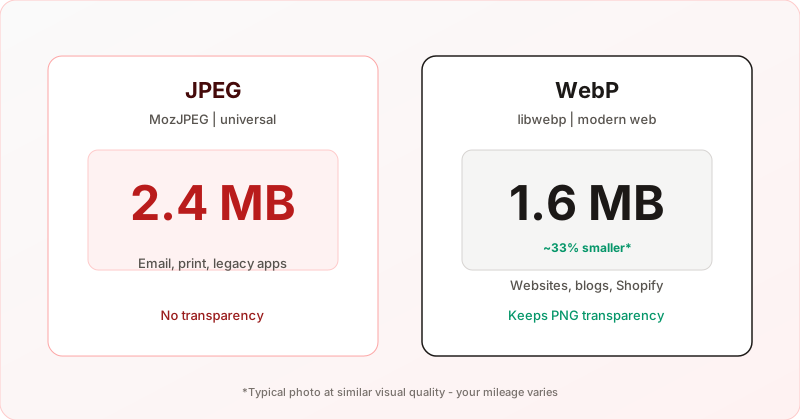
Most compressors pick a format for you. On ShrinkLocal you choose JPEG (MozJPEG) or WebP before processing — both run locally in your browser, so you can try either on the same file without uploading.
This guide helps you decide which output to use for photos, screenshots, and graphics with transparency.
Compress locally — pick JPEG or WebP, then drop your files.
Quick comparison
| JPEG (MozJPEG) | WebP | |
|---|---|---|
| Best for | Email, Slack, print, legacy apps | Websites, blogs, modern CMS |
| Typical file size | Larger at same visual quality | Often 25–35% smaller than JPEG |
| Transparency | No — PNG/WebP alpha flattened to white | Yes — alpha preserved |
| Browser support | Universal | All major browsers (2020+) |
| Lossy? | Yes | Yes (ShrinkLocal uses lossy WebP) |
Choose JPEG when…
- You are emailing or attaching files to tools that expect
.jpg. - Recipients use older software (some desktop viewers, office suites, or DAMs).
- The image is a straight photo with no transparency — MozJPEG is excellent for camera JPEGs and RAW exports.
- You need predictable behavior in print or PDF workflows.
Choose WebP when…
- You are publishing to a website, blog, or Shopify and want faster page loads.
- The source is a PNG with transparency (logos, UI mockups, icons) — WebP keeps the alpha channel; JPEG cannot.
- You already serve images via a CDN or CMS that supports WebP (most do in 2026).
- You want smaller files at quality 80–85 without a visible difference on screen.
Same photo: does WebP always win on size?
Usually for photos at quality 75–90, WebP is smaller. Exceptions:
- Already heavily compressed JPEG — re-encoding may save little; try lowering quality instead.
- Very small thumbnails — overhead matters less; either format is fine.
- Graphics with flat colors — PNG source → WebP often wins big; JPEG can show banding on gradients.
Because ShrinkLocal processes files on your device, you can export both formats from the same batch (run twice with different output selected) and compare file size and appearance — still no upload.
Quality settings: JPEG vs WebP
Quality sliders are not 1:1 across codecs. A useful starting point on ShrinkLocal:
- JPEG — 82–88 for photos; 75–80 if you need aggressive size reduction.
- WebP — 80–85 often matches JPEG at 85 visually, with smaller bytes.
Always zoom to 100% on important details (faces, text in photos, fine patterns) before shipping.
Avoid double lossy compression
Do not chain JPEG → WebP → JPEG through multiple online tools. Each lossy pass throws away information. ShrinkLocal decodes your file once and encodes directly to the format you pick — the same approach recommended in our no-upload compression guide.
Transparency: the deciding factor for many PNGs
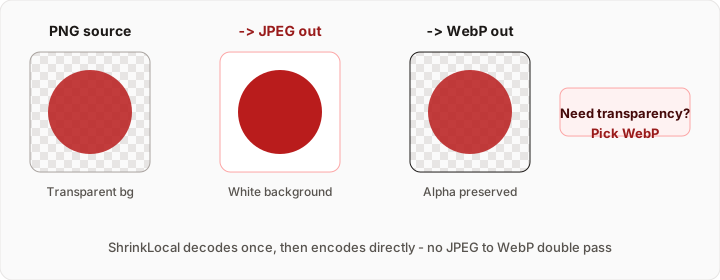
If your PNG has transparent pixels, WebP is the right output for web use. JPEG fills transparent areas with white on ShrinkLocal (standard for photo workflows). If white fringes around a logo are unacceptable, use WebP.
FAQ
Is WebP “better” than JPEG?
Better for web delivery and size; not better for universal compatibility. Pick based on where the file will live.
Will Apple Mail or Outlook show WebP?
Email clients are inconsistent with WebP. For email attachments, prefer JPEG.
Can I batch convert to WebP?
Yes. Select WebP output, drop up to 20 images, download individually or as a ZIP — all local.
Does ShrinkLocal upload my files to compare formats?
No. See how it works to verify in DevTools.
Ready to compress with the format you need?