
How to compress large images without uploading them
If you have a 5MB+ photo, most online compressors ask you to upload it first. ShrinkLocal runs entirely in your browser — JPEG or WebP out, batch mode, ZIP download, nothing sent to a server.
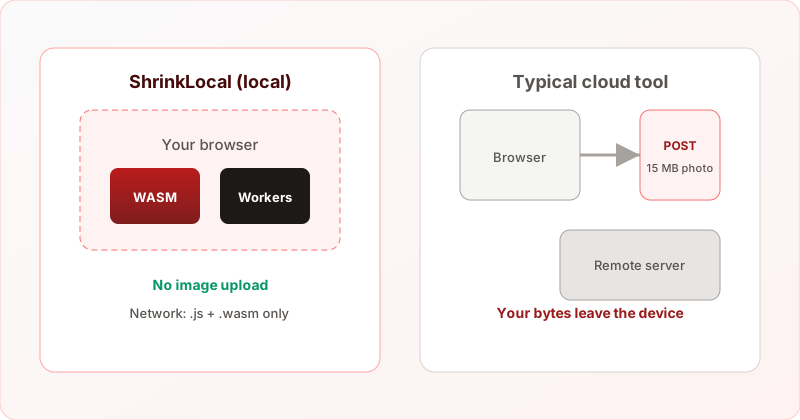
If you have a 5MB, 10MB, or 25MB photo, most online compressors ask you to upload the file to their servers. That is awkward for privacy, slow on poor uplinks, and risky for sensitive work.
ShrinkLocal compresses images inside your browser using WebAssembly. You can output JPEG (MozJPEG) or WebP, process multiple files in parallel, and download everything as a ZIP — without sending pixels to us.
Try it now — no signup, no upload.
Why “no upload” matters for large photos
- Privacy — IDs, interiors, kids, and unreleased work stay on your machine.
- Compliance — Teams under GDPR often cannot use random upload tools.
- Speed — Skipping a 20MB upload can beat cloud tools on slow connections.
- Control — DevTools can confirm no image POST requests (see how it works).
JPEG vs WebP: which output should you pick?
- JPEG (MozJPEG) — Universal. Use for email, Slack, older CMS, and print workflows. PNG transparency becomes white.
- WebP — Usually smaller for the web. Use for blogs, landing pages, and Shopify. Keeps PNG/WebP transparency.
ShrinkLocal decodes once and encodes directly to your chosen format — it does not compress to JPEG first and convert again (which would hurt quality).
What ShrinkLocal does
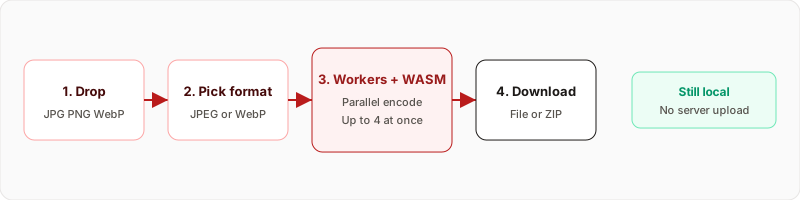
- Decodes JPG, PNG, or WebP in parallel Web Workers.
- Scales images larger than 8192px on the long edge if needed.
- Encodes with MozJPEG or libwebp (jSquash / Squoosh family).
- Lets you download each file or a ZIP of the whole batch.
Step-by-step
- Open ShrinkLocal.
- Select JPEG or WebP output.
- Drop one or more images (up to 20 per batch).
- Adjust quality if needed.
- Download individually or Download all as ZIP.
Tips for big files
- Already a tiny JPG? Gains may be small — try quality 75–80.
- PNG UI screenshot? WebP often beats JPEG on size; JPEG may look fine for photos inside the shot.
- Need transparency? Choose WebP output.
- Many files? Use desktop Chrome with enough RAM; close other heavy tabs.
FAQ
Is it free?
Yes. No account required.
Max file size?
Up to 100MB per file by default; practical limits depend on device memory.
Is it lossless?
Both JPEG and WebP outputs are lossy at typical quality settings — tuned for photos and web delivery, not archival PNG compression.
Ready to shrink large photos locally?